 YaoWise
Getting started
What kind of app is YaoWise?
YaoWise draws on traditional Chinese cultural tools—the six lines of the I Ching and the stem-and-branch calendar—to help you sort through what's happening in your life. It's for reflection and exploration, not for predicting the future.
Do I need to know the I Ching?
No. Write down what's on your mind and tap six times to cast a hexagram. Readings are in plain language, and you can tap a hexagram's name to see the original text.
How do I cast a hexagram?
Open YaoWise and write down something you're going through in the question box on the home screen. Tap six times and the six lines fall one by one. After casting, you can answer a few short questions to make your situation clear before the reading begins. The reading first responds to your question in one sentence, then looks at where things stand, how they might turn and what you can do.
What if I'm not sure how to ask?
On the home screen, pick a topic first, such as Career, Love, Study or Family, then choose the situation closest to yours. YaoWise helps you put the question into words, and you can still edit it yourself.
Can I enter a hexagram I cast myself?
Yes. In the question box on the home screen, switch from "Reading" to "Lay". Using the results of your three-coin tosses, start from the bottom line and set each line to yin or yang, then mark which lines are changing. If it's your first time, tap "Tutorial" for a four-step illustrated guide.
Do I need an account? How do I sign in?
You can look around without signing in. To cast a hexagram and get a reading, or to save your records, you need to sign in. Sign in with a verification code sent to your email; if you haven't signed up before, an account is created for you automatically. On iPhone you can also sign in with your Apple account, and a Google account works as well.
How do I use a friend's invite code?
After installing YaoWise, enter the code at the "Have an invite code?" step when you sign up. If you skipped that step, you can still add the code within 7 days of signing up, under ☰ → Settings → Invite Friends → Enter a code. Each account can enter a code only once, and it can't be your own. Once it goes through, you and the friend who invited you both get Yao Coins and readings; the amounts are as shown in the app.
If your friend sent an invite link, open it, tap "Copy code", then paste the code in when you sign up.
Who makes YaoWise?
YaoWise is developed and operated by Beijing Huoli Culture Technology Co., Ltd. Its filing details are at the bottom of every page. To get in touch, email support@yaowise.com.
Readings and content
How are YaoWise readings written?
Readings are written by AI in plain language, based on the situation you describe, and each one is labeled as AI-generated. While reading, tap a hexagram's name or any line to see the original I Ching text. YaoWise keeps evolving based on your feedback.
Can I base big decisions on a reading?
Readings are for reflection and as a cultural experience. They can't replace the advice of a doctor, lawyer or financial advisor. For an important decision, don't rely on a reading alone. If you're going through a very hard time, please reach out first to someone you trust, or to a local mental health helpline. When you write about a situation like this in YaoWise, YaoWise shows a helpline number too.
How do the four reading styles differ? Does switching change the conclusion?
In the app this is called "Reading Style", and there are four to choose from. Read again in another style and the conclusion stays the same; what changes is the way it's said. Which styles need unlocking, and how a re-read counts toward your readings, are as shown in the app.
Can I keep asking after a reading?
Yes. After a reading you can ask follow-up questions, and they don't count toward your daily readings. When your follow-ups run out, you can exchange Yao Coins for more.
Amounts are as shown in the app.What if I don't understand a term?
Tap a hexagram's name or any line to see the original I Ching text; the plain-language translation is in the Codex. In the Codex, Bazi, the Today panel and the Professional Chart, tap any term with a dotted underline for a plain-language note on what it means (requires YaoWise 3.0 or later).
What's in the Codex?
The Codex holds all 64 hexagrams in the standard I Ching sequence. For each one, the hexagram text and every line text come in the original with a plain-language translation. Each time you ask, the hexagram you cast lights up in your Codex, which also keeps track of how many times you've met it and what you asked each time. Tap to jump to related hexagrams. Every hexagram has its own card, ready to share with friends. The Codex is free to read.

BI · ADORNMENT
亨。小利有攸往。
Success. It is slightly favorable to go forward.
Can I save a date from a reading?
Yes. Save it as a Calendar Note and it goes into your Calendar. When the day comes, YaoWise reminds you to look back, and when you do, you can tell YaoWise how things turned out.
Can I find and share past readings?
They're all in History. Search by your question or by words in the reading, or show only Unread, Favorites or This Week. When you finish a reading, you can turn it into a card to send to friends.
Bazi and Today
What do I enter for Bazi? Can I skip it?
Bazi is the traditional Chinese birth chart. Your birth date and gender are required. Add your birth time and birthplace if you can; the chart is more detailed with them. You can enter a Gregorian or Chinese lunar date, lunar leap months included. Birthplaces cover 244 countries and regions worldwide, down to district and county level in China. You can skip Bazi for now without affecting casting or readings, and add it later by opening Bazi from the ☰ menu at the top right.
Why is my birth time "adjusted"?
The same clock time doesn't fall in the same traditional Chinese hour everywhere. If you've entered a birthplace, the page notes that your time has been adjusted for it; if the adjustment moves you into a different hour, it also says which hour your Hour Pillar is based on. If you haven't entered a birthplace, the chart uses the time as you entered it, and the page tells you that too.
What if I don't remember my birth time?
When you choose the time, go with your best guess. If you find a more exact time later, open Bazi from the ☰ menu at the top right and change it.
Can I add profiles for family and friends?
Yes. In Bazi, create a profile for each family member or friend. When you ask, you can choose who you're asking for. How many profiles you can create is as shown in the app.
If I change my birth details, will my past readings change?
No. Your past hexagram readings stay exactly as they were. The character reading on the Bazi page stays too, and "Regenerate" appears next to it. Tap it if you'd like a new version based on your updated details (regenerations per day are limited).
What does the character reading on the Bazi page show?
As soon as you've entered your birth details, you'll see your Four Pillars, your Five Elements and a short sketch of you. The full "AI Character Reading" is on the Bazi page too.
What is Today?
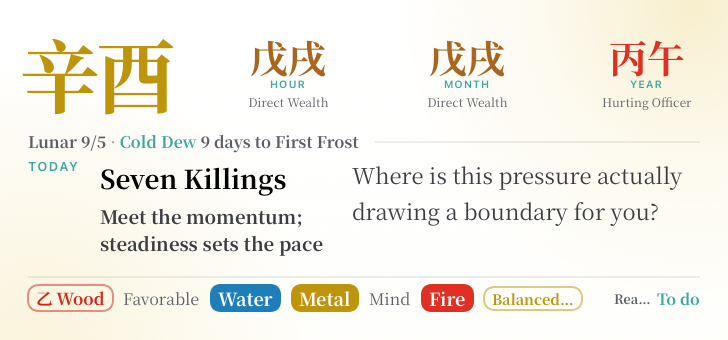
From YaoWise 3.0 on, Today is at the top of the home screen when you open the app. It shows today's pillar, solar term and hour (the traditional Chinese markers of time), tells you what kind of day it is for you based on your birth chart, then leaves you a question to ask yourself. It is a modern rendering of traditional stem-and-branch theory, for self-reflection only—it does not imply any fixed outcome and is not a basis for decisions.
What does Today's Reading do?
Today's Reading is written by AI. It draws on your birth chart and puts today into two or three sentences.
Account and privacy
What happens to what I write?
We don't use what you write to train AI models. You can delete your records and your account in the app, or email support@yaowise.com to request a copy of your data. How it's used and how long it's kept are set out in the Privacy Policy.
Will my records still be there on a new phone or after reinstalling?
Yes. Your readings, Yao Coins and membership go with your account and aren't stored on the phone. After switching phones or reinstalling, sign in to the same account the way you did before and you'll see them. Only the stars that mark your Favorites are kept on the phone you're using, so you'll need to mark them again on a new phone.
How long are my readings kept? Can I delete them?
They're kept for as long as you have an account; YaoWise doesn't clear them out automatically. To delete one, swipe left on it in History, or long-press to enter multi-select and delete several at once. Deleted records can't be recovered. Deleting records doesn't affect your Yao Coins or membership.
How do I export my data?
Email support@yaowise.com with the subject "Data export request" and say which data you'd like to export. YaoWise usually replies within 7 business days, and no later than 15. The copy of your data is a JSON file.
How do I delete my account?
In the app, open ☰ → Settings and tap the pencil icon at the top right of the membership card to open Profile. Scroll to the bottom, tap "Delete Account", type "DELETE MY ACCOUNT" yourself and submit. A 24-hour cooling-off period follows. During that time your account works as usual, except that you won't receive notifications (including Calendar Note reminders). You can cancel the deletion anytime in the same place, and notifications resume once you do. The deletion only runs after the 24 hours, and once it has run it can't be undone.
If you can't open the app, you can also email support@yaowise.com with the subject "Account deletion request". Include the email address you signed up with. Replies usually come within 7 business days, and no later than 15.
What happens to my Yao Coins, membership and subscription after I delete my account?
Once the deletion runs, your profiles, readings and calendar are deleted. Your Yao Coins and any readings you exchanged them for are cleared, and your membership ends as well. None of this is refunded. Your invite code stops working, but friends you've already invited aren't affected. Transaction records are kept as the law requires, with identifying information removed.
If you subscribed through the App Store or Google Play, deleting your account doesn't cancel the subscription for you. Cancel it in the store first, or you'll keep being charged.
Can I delete some of my data without deleting my account?
Yes. Delete readings yourself in History. Profiles for family and friends can be deleted; your own can be edited, but not deleted or cleared. Change your name, avatar and birth details in Profile. You can unlink a sign-in account such as Apple or Google yourself: in Profile → Linked Accounts, tap "Unlink" on that row. The only sign-in method you have left can't be unlinked. Calendar data is the one thing that needs an email: write to support@yaowise.com. Replies usually come within 7 business days, and no later than 15. Deleting data is free and doesn't affect your Yao Coins or membership. Full details are on the Data Deletion page.
Can minors use YaoWise?
YaoWise is not intended for children under 14. If you're 14 or older but under 18, please read the Privacy Policy together with a parent or guardian, and use the app only with their consent.
Download and devices
- When the download finishes, tap the APK to open it.
- If you see "Install blocked" or a message about unknown sources, tap "Settings".
- Turn on "Allow from this source".
- Go back and finish installing.
How do I download and install it?
iPhone and iPad: search for "YaoWise" in the App Store.
Android: search for "YaoWise" on Google Play, or download the APK from this site.
How do I install the Android APK?
How to install the APK
What are the system requirements? Does it work on iPad?
Yes, it works on iPad. iPhone and iPad need iOS 15.1 or later, and Android phones need Android 7.0 or later. The Home Screen and Lock Screen widgets have their own requirements; see the last question in this group.
Will YaoWise keep getting updates? How do I update?
Yes. The I Ching has a lot more to offer, and YaoWise keeps building new features based on your feedback.
If you installed from the App Store or Google Play, updates come through the store. If you installed the APK, tap to update when "Update Available" appears in the app, or come back to this site, download the latest APK and install it directly. Your records go with your account, so nothing is lost. What each version added is listed in What's New.
How do I change the language?
In the app, go to ☰ → Settings → Language to switch anytime between Simplified and Traditional Chinese, English, Japanese and Korean. Readings after that are written in the language you choose.
Is there a dark mode?
Yes. In the app, go to ☰ → Settings → Dark Mode and choose Light, Dark or Automatic (follows your system setting).
Which phones support the Home Screen and Lock Screen widgets?
Only iPhone for now, with iOS 17 or later and YaoWise 3.0 or later. Android phones don't have widgets yet; today's pillar, solar term and question are on the YaoWise home screen whenever you open the app.
Home Screen: touch and hold an empty spot until the apps jiggle. Tap "Edit" at the top left, then "Add Widget" (on iOS 17, tap "+" at the top left), search for "YaoWise", pick a size and add it.
Lock Screen: touch and hold the Lock Screen and tap "Customize". Tap "Add Widgets" below the time, choose the ones you want, then tap "Done".
It's up to you whether the Lock Screen shows your ten gods and prompt, which are personal to you. With that off, it shows only what anyone can look up: pillars, solar term and hour. Open YaoWise once and the widgets keep turning the page for about a week, even offline.
Membership
- Daily AI deep readings (Free: 1 / Monthly: 5 / Annual: 10)
- Cross-reading follow-ups (monthly pool: Monthly 30 / Annual 50)
- Personalized reading from your birth chart (one free try in each reading style)
- Profile slots (Free: 5 / Members: 20)
- VIP badge
- Subscribed through the App Store: cancel on your iPhone or iPad in Settings → [your name] → Subscriptions. You can also tap "Manage in Apple Subscriptions" in the app under ☰ → Settings → Membership Center.
- Subscribed through Google Play: in the Play Store app, go to profile icon → Payments & subscriptions → Subscriptions → YaoWise → Cancel subscription.
- Bought through the App Store: request a refund from Apple (reportaproblem.apple.com). Whether to grant it is Apple's decision.
- Bought through Google Play: request a refund from Google under Google Play's rules.
- Charged twice or charged in error: email support@yaowise.com and explain what happened.
What's free, and what do members get?
Casting, entering your own hexagram, 1 AI deep reading a day, 3 follow-ups per reading, the Codex, History and your Bazi chart with its Five Elements are all free. Member benefits (names as they appear in the app):
A few more things need a membership. Saving Calendar Notes and Today's Reading can each be tried once for free. AI Character Reading shows a short sketch for free; the full version needs a membership.
How much is a membership?
There are two plans, monthly and annual. Prices are shown in the app under ☰ → Settings → Membership Center, based on the region of your App Store or Google Play account.
How soon does a membership start? Can I switch from monthly to annual?
It starts as soon as your payment goes through, and you get the full daily allowance of readings that same day. You can switch from monthly to annual: when you change plans, the unused days on your old plan are added to the end date of the new one. For example, if you switch to annual with 7 days left on monthly, your new end date is one year plus 7 days away. To go from annual back to monthly, turn off auto-renewal first, then choose monthly once the annual plan has ended. If you subscribed through the App Store, Apple handles downgrades under its own rules.
What if I run out of daily readings?
Your daily readings come back the next day. If you'd rather not wait, exchange Yao Coins for more; readings you get this way don't clear with the daily reset. Follow-ups are counted separately and don't use your daily readings. Running out doesn't affect your other member benefits, such as profile slots and the VIP badge.
Amounts are as shown in the app.What are Yao Coins? How do I get them?
Yao Coins are the virtual coins used in the YaoWise app. They work only in the app: they can't be cashed out or transferred to anyone else. Exchange them for readings and follow-ups, or use them to unlock reading styles. You can top up in the app, or collect them without spending anything: finishing a reading each day checks you in automatically and gives you Yao Coins, and so does a successful invite. See your check-ins under ☰ → Settings → Task Center, and exchange coins under ☰ → Settings → Coin Exchange. If you delete your account, your Yao Coins are cleared and not refunded.
Exchange rates and amounts are as shown in the app.How do I cancel my subscription? How long does my membership last afterward?
You can cancel anytime, and the period you've already paid for runs as usual until its end date. Please cancel at least 24 hours before the next billing date (at least 48 hours for Google Play subscriptions), or you may still be charged for the coming period.
Full details are in the Auto-Renewal Service Agreement.
Will I be reminded before I'm charged?
YaoWise subscriptions made through the App Store or Google Play are renewed by the store, and Apple or Google sends renewal reminders under its own rules. You can see your next renewal date on the store's subscriptions page.
Can I get a refund?
A membership is active as soon as you subscribe, and Yao Coins as soon as they reach your account. Unless the law provides otherwise, what you've already paid is not refunded. Once you cancel your subscription, you won't be charged again.
When a refund goes through, the membership time it paid for ends as well.
Nothing found. Email support@yaowise.com and YaoWise will answer.
Can't find your answer?
Email support@yaowise.com. Replies usually come within 7 business days, and no later than 15.
You can also leave a message in the app under ☰ → Settings → Help & Feedback.